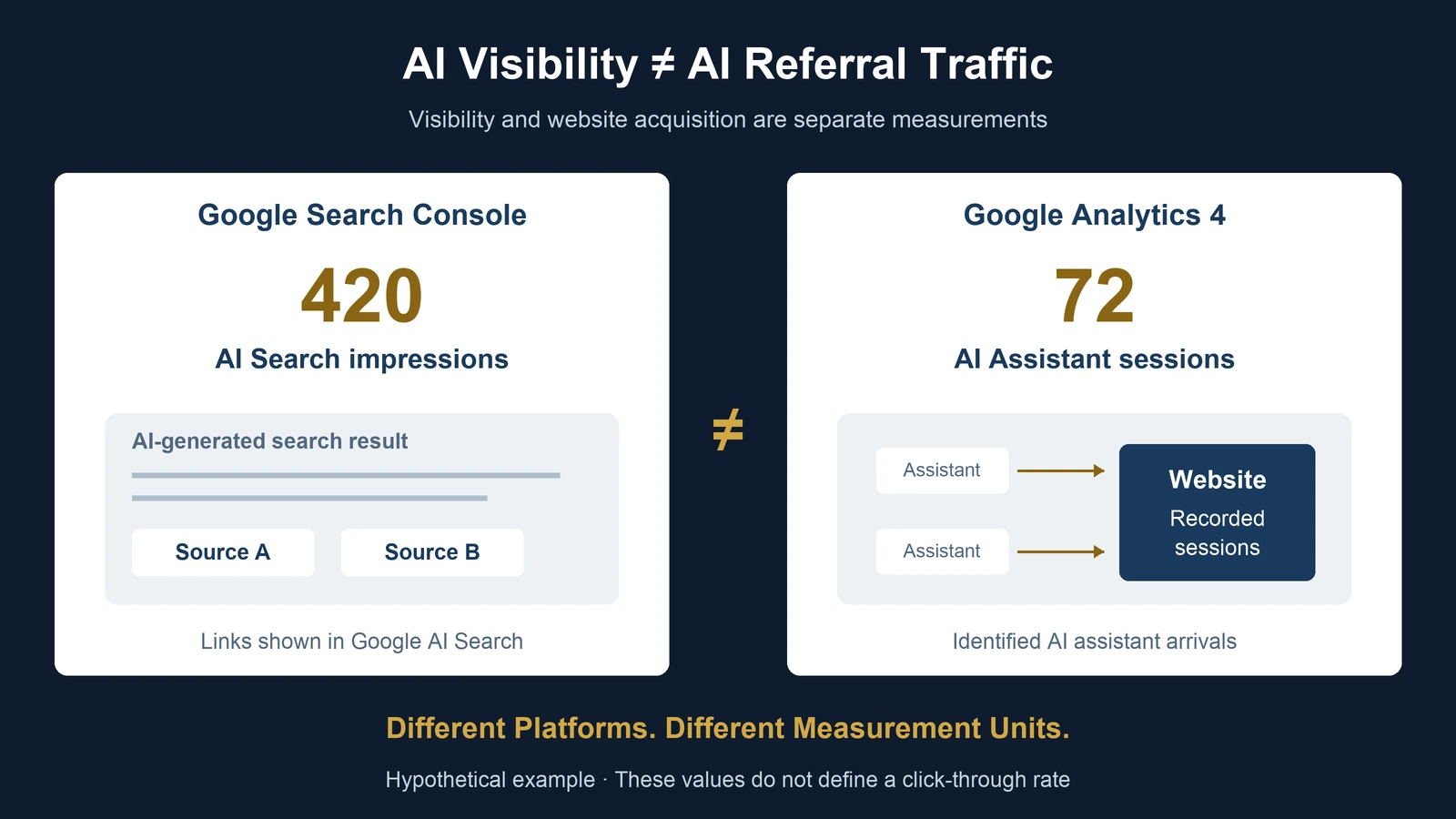
A business opens Google Search Console and discovers that its website received 420 impressions in Google's generative AI search features.
The marketing team then opens Google Analytics 4.
The AI Assistant channel shows 72 sessions.
Management asks a reasonable question:
"If our website appeared 420 times in AI search, why did we receive only 72 AI visits?"
It is tempting to divide 72 by 420 and report a 17.1% AI search click-through rate.
But that calculation would be misleading.
The two numbers do not necessarily describe the same platform, audience, interaction, or measurement event.
Google Search Console's Generative AI Performance report measures visibility within supported Google Search AI features.
GA4's AI Assistant channel identifies website traffic from recognized AI assistant sources.
Importantly, Google's AI Overviews and AI Mode are excluded from GA4's AI Assistant channel and are classified within Organic Search.
Therefore, the two reports are not supposed to match.
The useful business question is not how to force them into agreement.
It is how to interpret each metric correctly and connect search visibility with meaningful website activity.
The Short Answer: AI Impressions and AI Sessions Are Different Measurements
An impression is a visibility event.
A session is a website activity measurement.
A Google AI Search impression does not mean someone visited the website.
A GA4 AI Assistant session does not necessarily originate from Google Search.
These differences are fundamental.
| Measurement | Platform | What It Describes |
|---|---|---|
| Generative AI Search impressions | Google Search Console | Visibility of site links in supported Google AI Search features |
| Generative AI Discover impressions | Google Search Console | Visibility in supported generative AI Discover features |
| AI Assistant sessions | GA4 | Sessions attributed to recognized AI assistant sources |
| Organic Search sessions | GA4 | Sessions attributed to organic search, including Google AI Overviews and AI Mode |
| Key events | GA4 | Recorded important interactions under the property's event configuration |
The metrics can be used together, but they should not be treated as interchangeable.
This distinction becomes especially important when management wants to evaluate the commercial value of AI search visibility.
What Changed in Google Search Console in 2026?
On June 3, 2026, Google announced dedicated Generative AI Performance reports in Search Console.
Google subsequently stated that these insights had been rolled out to websites worldwide as of August 31, 2026.
The reports provide separate visibility information for supported generative AI features in Search and Discover.
The Search report includes:
- AI Overviews
- AI Mode
Its documented dimensions include:
- Pages
- Countries
- Devices
- Dates
It also supports text-based and multimodal search-type filtering.
The dedicated report is focused on impressions.
It should not be interpreted as a complete report of clicks, conversions, or the causal value of AI-generated search exposure.
Google also notes that a property may not show the report when it has insufficient eligible impressions.
An absent report is therefore not necessarily evidence of a broken website or analytics implementation.
Official source:
Google Search Central, June 3, 2026. Introducing Search Generative AI Performance Reports.
https://developers.google.com/search/blog/2026/06/gen-ai-performance-reports
Google Search Console Help:
https://support.google.com/webmasters/answer/16984139?hl=en
What Does an AI Search Impression Actually Mean?
Google's Generative AI Performance report counts impressions associated with links shown to users within supported generative AI features.
This is not equivalent to counting:
- Website visitors
- Clicks
- Leads
- Unique people
- AI assistant conversations
- Purchases
The distinction is important because a user may see a linked source without opening it.
A page can therefore gain search visibility without generating a corresponding GA4 session.
This does not automatically mean the visibility was commercially valuable or commercially worthless.
It means the visibility and downstream behavior must be evaluated separately.
Google Search and Discover Should Also Be Kept Separate
Google provides distinct generative AI performance views for Search and Discover.
Search and Discover involve different discovery contexts and impression definitions.
A reporting dashboard should preserve their separate source labels.
If management wants a combined exposure total, the report should explicitly define what has been combined.
It should not silently present different reporting environments as one homogeneous metric.
What Does GA4's AI Assistant Channel Measure?
Google Analytics 4 uses channel definitions to classify recorded website acquisition.
The AI Assistant channel includes recognized sources such as ChatGPT, Gemini, DeepSeek, Copilot, and Grok.
However, Google explicitly excludes its own AI Overviews and AI Mode from this channel.
Those Google AI Search experiences belong within Organic Search.
This creates an important reporting distinction.
A user who clicks a link from a Google AI Overview may appear in GA4's Organic Search channel.
A user who clicks a link from a recognized standalone AI assistant may appear in GA4's AI Assistant channel.
Both experiences involve AI-assisted discovery.
But GA4 does not classify them under the same channel.
Google Analytics Help documents this distinction in its default channel group definitions.
Official source:
https://support.google.com/analytics/answer/9756891?hl=en
Session Scope Matters
GA4 supports different traffic-source dimensions.
For example:
Session default channel group describes acquisition associated with sessions.
First user default channel group describes the acquisition channel associated with a user's initial acquisition.
Event-scoped channel dimensions can reflect attribution settings for key events.
These are different analytical scopes.
For a traffic acquisition analysis, session-level dimensions are generally the relevant starting point.
An analyst should not compare first-user channel counts with session counts as though they represent the same measurement population.
A Worked Example: Three Numbers That Do Not Have to Match
Consider a hypothetical professional services website.
During October, its reporting systems show the following:
| Source | Measurement | Value |
|---|---|---|
| Search Console | Google AI Search impressions | 420 |
| GA4 | AI Assistant sessions | 72 |
| GA4 | Organic Search sessions | 310 |
| GA4 | AI Assistant sessions with a qualified inquiry | 6 |
All values are hypothetical.
They are not UAD Consulting's actual website analytics or client results.
Assume the reporting period is broadly aligned and the GA4 session measures use the same property and reporting configuration.
Interpretation 1: The 420 Impressions
The website appeared in supported Google generative AI Search features according to Search Console's impression-counting rules.
That establishes observed visibility within the reporting system.
It does not establish that 420 unique people visited the website.
It does not establish that the links received 420 clicks.
Interpretation 2: The 72 AI Assistant Sessions
GA4 attributed 72 sessions to its AI Assistant channel.
These are recorded website sessions associated with recognized AI assistant sources.
They are not the set of clicks generated by the 420 Google AI Search impressions.
In particular, the AI Assistant channel excludes Google's AI Overviews and AI Mode.
Interpretation 3: The 310 Organic Search Sessions
GA4 attributed 310 sessions to Organic Search.
Some of those sessions may have originated from Google's AI Overviews or AI Mode.
Others may have originated from conventional organic search results.
The aggregate Organic Search count alone does not identify the exact split.
It would be incorrect to label all 310 sessions as Google AI Search traffic.
Interpretation 4: The Six Inquiry Sessions
Suppose six of the 72 AI Assistant sessions contained at least one verified qualified inquiry.
The observed session-level inquiry rate is:
6 / 72 × 100 = 8.33%.
Rounded:
8.3%.
This is a meaningful within-channel descriptive measure, assuming the numerator counts distinct qualifying sessions rather than raw repeated events.
It does not mean AI assistants caused six incremental inquiries.
The visitors may have encountered the business through other channels before arriving.
The Calculation You Should Not Make
72 / 420 × 100 = 17.14%.
The arithmetic is correct.
But calling the result a Google AI Search click-through rate is not.
The numerator measures sessions from the GA4 AI Assistant channel.
The denominator measures Google generative AI Search impressions.
The numerator is not a verified subset of the denominator.
The resulting percentage has no defensible interpretation as a click-through rate.
The correct conclusion is that the available data do not support that particular calculation.
A Second Example: Why Search Console Page Impressions Can Exceed the Property Total
A less obvious discrepancy can occur entirely inside Google Search Console.
Google explains that the Generative AI Search report uses different aggregation rules depending on whether the data is grouped by property or by page.
Suppose a website has two articles.
Article A appears in 300 generative AI Search result exposures.
Article B appears in 180.
Assume both articles appear together in 60 of those exposures.
For simplicity, suppose each exposure represents one countable generative AI search result context and there are no other pages involved.
The page-level total is:
300 + 180 = 480 page impressions.
But the property-level total counts the same site's presence only once when both results appear together.
Therefore:
Property impressions = 300 + 180 - 60
= 420.
The dashboard could legitimately show:
| View | Impressions |
|---|---|
| Article A | 300 |
| Article B | 180 |
| Sum of page rows | 480 |
| Property-level total | 420 |
There is no arithmetic error.
The difference arises from aggregation rules.
The 60 shared exposures contribute to both page-level counts but only once to the property-level total.
This is a simplified illustration of Google's documented aggregation behavior.
It does not imply that Search Console exposes a direct overlap count for individual AI result exposures.
Why This Matters for Reporting
A team might export page-level data, sum every row, and compare the result with the headline property total.
If the numbers differ, the team might assume records are missing or duplicated.
But the aggregation units are different.
The correct reporting approach is to preserve the grain of each measure.
Property-level impressions and page-level impressions should be labeled separately.
A total constructed from page rows should not automatically be substituted for the property-level metric.
Official reference:
https://support.google.com/webmasters/answer/16984139?hl=en
Why the Date Range May Still Produce Different Results
Even when two reports cover October 1 through October 31, their underlying reporting rules may differ.
Google Search Console's Search performance reporting uses Pacific Time for date-based grouping.
GA4 reporting uses the property's configured reporting timezone.
A session or impression occurring near midnight may therefore fall on different reporting dates.
Additional differences can arise from:
- Data processing delays
- Preliminary versus finalized data
- Analytics consent and collection settings
- Browser or tracking restrictions
- Attribution scope
- Channel classification rules
- URL redirects
- Canonical URL assignment
- Report filters
These differences do not explain every discrepancy.
They are diagnostic possibilities to investigate.
An analyst should not assume that timezone differences or blocked tracking caused a mismatch without supporting evidence.
Canonical URLs Are Especially Important
Search Console commonly associates performance with a page's canonical URL.
GA4 records website activity according to its own page and session measurement rules.
Suppose an article is available through:
/ai-guide.html
and:
/ai-guide
The website should establish one canonical public identity.
For UAD Consulting, the public standard is the extensionless URL.
The physical .html file can exist internally.
But the public article URL, canonical, sitemap entry, internal links, and structured-data page identity should agree.
The legacy .html URL should redirect directly to the clean URL.
This reduces ambiguity when analysts compare page-level visibility with landing-page performance.
It does not make Search Console impressions and GA4 sessions directly comparable.
It simply creates a more reliable page identity for reporting.
How to Build a Trustworthy AI Search Dashboard
A useful reporting system should separate three measurement layers.
Layer 1: Google AI Search Visibility
Source:
Google Search Console Generative AI Performance report.
Suggested measures:
- Property-level AI Search impressions
- Page-level AI Search impressions
- Pages receiving AI Search visibility
- Country and device breakdowns
- Daily, weekly, or monthly trends
- Search versus Discover visibility
Avoid presenting summed page impressions as the property-level total.
Layer 2: Identified Website Acquisition
Source:
Google Analytics 4.
Suggested measures:
- AI Assistant sessions
- Organic Search sessions
- Landing pages
- Engaged sessions
- Session-level inquiry rate
- Relevant key events
Keep GA4's AI Assistant and Organic Search channels distinct.
Do not relabel all Organic Search traffic as AI-generated search traffic.
Layer 3: Business Outcomes
Source:
GA4 and appropriately connected business systems.
Suggested measures:
- Qualified inquiries
- Consultation requests
- Completed purchases
- Qualified opportunities
- Recorded revenue
- Customer acquisition outcomes
Use clear attribution rules.
If a lead is associated with an AI Assistant session, report that association.
Do not automatically describe it as a lead caused by AI search.
A Practical Reporting Table
A simple executive dashboard might contain:
| Reporting Layer | Metric | Example | Interpretation |
|---|---|---|---|
| Google AI Search | Property impressions | 420 | Observed Google AI Search visibility |
| Google AI Search | Sum of page impressions | 480 | Page-level visibility, different aggregation |
| GA4 acquisition | AI Assistant sessions | 72 | Recorded sessions from recognized AI assistant sources |
| GA4 acquisition | Organic Search sessions | 310 | Includes conventional organic search and eligible Google AI Search visits |
| GA4 outcomes | Qualified inquiry sessions from AI Assistant | 6 | Observed qualifying sessions |
| Derived GA4 measure | Inquiry session rate | 8.3% | Six qualifying sessions divided by 72 AI Assistant sessions |
These values are illustrative.
The table deliberately avoids calculating a cross-platform click-through rate.
It also avoids adding the two Search Console impression measures together.
Each metric has a defined unit, source, and interpretation.
What Should You Investigate When AI Visibility Increases but Traffic Does Not?
Suppose a website's Google AI Search impressions rise over several weeks.
Meanwhile, GA4's AI Assistant sessions remain flat.
This is not necessarily evidence that something is broken.
The two measurements cover different experiences.
A more appropriate investigation would ask:
Did Google AI Search impressions increase on particular pages?
Did overall Organic Search sessions change?
Were the same canonical pages involved?
Did the website experience changes in tracking, redirects, or consent configuration?
Did relevant business conversions change?
Were search demand, content, competition, or reporting rules changing during the period?
These questions can identify plausible explanations.
But they should not be converted into causal conclusions without additional evidence.
For a broader framework connecting discovery, citations, visits, and business outcomes, see UAD Consulting's article:
How Do You Measure AI Search Visibility?
Does More AI Search Visibility Cause More Leads?
Not necessarily.
An increase in Google AI Search impressions is evidence of increased measured visibility under the reporting system.
An increase in GA4 AI Assistant sessions is evidence of increased recorded acquisition from that channel.
An increase in inquiries is evidence of increased observed inquiry activity.
If all three rise together, the changes are associated in time.
That does not establish that the first caused the second or third.
Other explanations may include:
- Increased market demand
- New advertising campaigns
- Stronger branded search activity
- Changes in content distribution
- Seasonal demand
- Website conversion improvements
- Changes in measurement configuration
A causal estimate requires a credible counterfactual.
For example, a controlled content rollout or carefully designed comparison may help evaluate the incremental effect of a specific intervention.
Even then, spillover effects, changing search interfaces, and incomplete observation must be considered.
For related methodology, see:
Did Your SEO Changes Actually Increase Organic Traffic?
What About Missing AI Assistant Referrals?
GA4's AI Assistant channel depends on its classification rules and available acquisition information.
Not every visit influenced by an AI-generated answer will necessarily be identifiable as an AI Assistant session.
For example, a person may read about a company in an AI response and later:
- Search for its name
- Enter its URL directly
- Use a bookmark
- Open the site from another device
The later session may have a different recorded acquisition source.
Similarly, missing or altered referral information can limit classification.
An unexplained Direct session should not automatically be reassigned to AI Assistant.
Without supporting evidence, the original source may remain unknown.
For more on this measurement issue, see:
Why Is Most of My GA4 Traffic Direct?
A Monthly Audit Framework
A practical monthly review can follow six steps.
1. Export the Available Google AI Search Data
Record the reporting period, property, impressions, pages, and available geographic or device dimensions.
Preserve whether the metric is property-level or page-level.
2. Review GA4 Session Acquisition
Use session-level traffic acquisition dimensions.
Separate AI Assistant, Organic Search, Direct, and other relevant channels.
Do not use event-scoped attribution dimensions as substitutes for session acquisition.
3. Normalize Page Identities
Use canonical extensionless URLs.
Check redirects, sitemap entries, and landing-page paths.
Document any URL mapping assumptions.
4. Validate the Measurement Environment
Check analytics collection, consent settings, internal traffic handling, and reporting timezone.
Record significant configuration changes.
5. Connect Activity to Business Outcomes
Measure qualified inquiries, conversions, or other meaningful outcomes within a clearly defined GA4 population.
Avoid mixing event counts with unique qualifying sessions.
6. Report Uncertainty Explicitly
Identify what is observable, what is estimated, and what cannot be inferred.
Do not manufacture a single AI-search conversion funnel from incompatible metrics.
The objective is a reliable measurement system, not a dashboard where every number has been forced to reconcile.
The Bottom Line: Different Numbers Can Both Be Correct
Google Search Console and Google Analytics 4 answer different questions.
Search Console's Generative AI Performance report helps website owners understand visibility in supported Google AI Search experiences.
GA4's AI Assistant channel measures recorded sessions from recognized AI assistant sources and excludes Google's AI Overviews and AI Mode.
Even within Search Console, property-level and page-level impressions can differ because of aggregation rules.
Our hypothetical example produced:
420 property-level Google AI Search impressions.
480 summed page-level impressions.
72 GA4 AI Assistant sessions.
310 GA4 Organic Search sessions.
Six qualifying AI Assistant inquiry sessions.
These numbers can coexist without contradiction.
The mistake would be treating them as different versions of the same measurement.
A trustworthy AI search reporting framework preserves their definitions, reporting populations, and limitations.
The business objective is not to create one impressive AI visibility percentage.
It is to understand where the organization is visible, what website activity is observable, which outcomes matter, and what the evidence can legitimately support.
References and Methodological Notes
Google Search Central. Introducing Search Generative AI Performance Reports in Search Console. June 3, 2026; global rollout update August 31, 2026.
https://developers.google.com/search/blog/2026/06/gen-ai-performance-reports
Google Search Console Help. Generative AI Performance Report (Search).
Google Search Console Help. Generative AI Performance Report (Discover).
Google Analytics Help. Default Channel Group.
Google Search Console Help. Search Generative AI Control.
Methodological Note
All numerical examples are hypothetical and created for educational purposes.
They are not actual UAD Consulting analytics, customer data, or measured commercial outcomes.
The 420-versus-480 impression example illustrates Google's documented difference between property-level and page-level aggregation.
The GA4 examples assume appropriately configured session-level measurement.
Platform features, channel definitions, and report availability may change. The official product documentation should be checked when implementing a live measurement workflow.
Make AI Search Performance Measurable
AI search visibility, website traffic, and business outcomes require different measurement approaches.
UAD Consulting helps organizations connect Google Search Console, GA4, SEO analysis, and reporting frameworks to make digital performance easier to understand and evaluate.
Explore our SEO & AI Search Analytics services or get in touch to discuss your measurement challenges.
Explore ServicesGet in Touch