A business launches a new website.
It begins publishing articles, sharing content on LinkedIn, sending newsletters, and improving its search visibility.
Several weeks later, management opens Google Analytics 4.
The Traffic Acquisition report shows an unexpected result:
Most sessions are classified as Direct.
Organic search accounts for a relatively small percentage.
Social media contributes less than expected.
Email campaigns appear almost invisible.
Management asks a reasonable question:
"Are people really visiting our website directly, or is something wrong with our analytics?"
The answer requires more than looking at the Direct percentage.
Direct traffic is a measurement classification.
It is not a verified description of how every visitor discovered the website.
A large Direct share may reflect genuine direct navigation, missing referral information, campaign-tagging problems, internal website testing, or a combination of these factors.
Before making marketing decisions from the report, a business should investigate what the classification actually represents.
The Short Answer: Direct Traffic Does Not Always Mean Someone Typed Your URL
In Google Analytics 4, the source/medium combination:
(direct) / (none)
generally represents traffic for which Analytics does not have a clear identifiable referral source.
Some of those visitors may have entered the website address directly.
Others may have used bookmarks.
Some may have followed links from documents, messaging applications, or other environments that did not provide usable referral information.
Campaign tracking may also be incomplete.
Google's official documentation explains several reasons that traffic can appear as Direct, including missing campaign information and redirects that interfere with attribution.
Source:
Google Analytics Help. Understand (direct) / (none) traffic.
The important distinction is:
Direct is an analytics classification.
It is not proof of a particular visitor's intention or navigation method.
Why Can a Website Have So Much Direct Traffic?
Several mechanisms can contribute.
1. Genuine direct navigation
A returning customer may type a familiar domain into the browser.
Another visitor may use a bookmark.
These are legitimate examples of direct navigation.
For a well-known brand, genuine direct navigation may represent an important source of traffic.
However, GA4 does not provide a reliable way to determine from the Direct label alone which individual visits came from typed URLs.
2. Missing UTM campaign parameters
Suppose a business shares an article through an email newsletter.
The newsletter contains a normal website link.
If the visit arrives without usable campaign or referral information, GA4 may classify the session as Direct.
A properly tagged campaign link can provide more explicit acquisition information.
For example:
https://www.example.com/article?utm_source=newsletter&utm_medium=email&utm_campaign=october_insights The parameters identify:
utm_source:
The referring platform or source.
utm_medium:
The marketing medium.
utm_campaign:
The campaign name.
This does not guarantee perfect measurement.
But consistent tagging reduces ambiguity when the parameters are preserved and processed.
3. Referral information is unavailable
Some browsers, applications, documents, and navigation environments may not provide the referral information that analysts expect.
The resulting visit may be classified as Direct.
This is sometimes discussed under the informal term "dark social."
However, analysts should be careful with that expression.
An unexplained Direct session is not automatically a social media visit.
Without supporting evidence, its true origin remains unknown.
4. Redirects interfere with campaign information
A marketing link may pass through:
A URL shortener.
A tracking domain.
A redirect service.
A website migration rule.
A canonical URL redirect.
If campaign parameters disappear before the analytics tag receives the landing-page information, the session may lose useful acquisition context.
Not every redirect causes this problem.
A correctly configured redirect can preserve query parameters.
The relevant question is whether the final landing page receives the expected campaign information.
5. Internal website activity
Business owners, analysts, developers, and marketing teams often visit their own websites repeatedly.
They may test:
Homepage changes.
Blog articles.
Navigation.
Contact forms.
Consultation buttons.
Analytics events.
Mobile layouts.
SEO metadata.
Deployment changes.
These visits can enter GA4 unless they are excluded or otherwise separated.
On a low-traffic website, internal activity can represent a meaningful portion of recorded sessions.
That can distort acquisition, engagement, and conversion reporting.
However, a high Direct percentage does not prove that internal activity is the cause.
The hypothesis must be tested.
A Worked Example: A Website With 72% Direct Traffic
Consider a hypothetical consulting website.
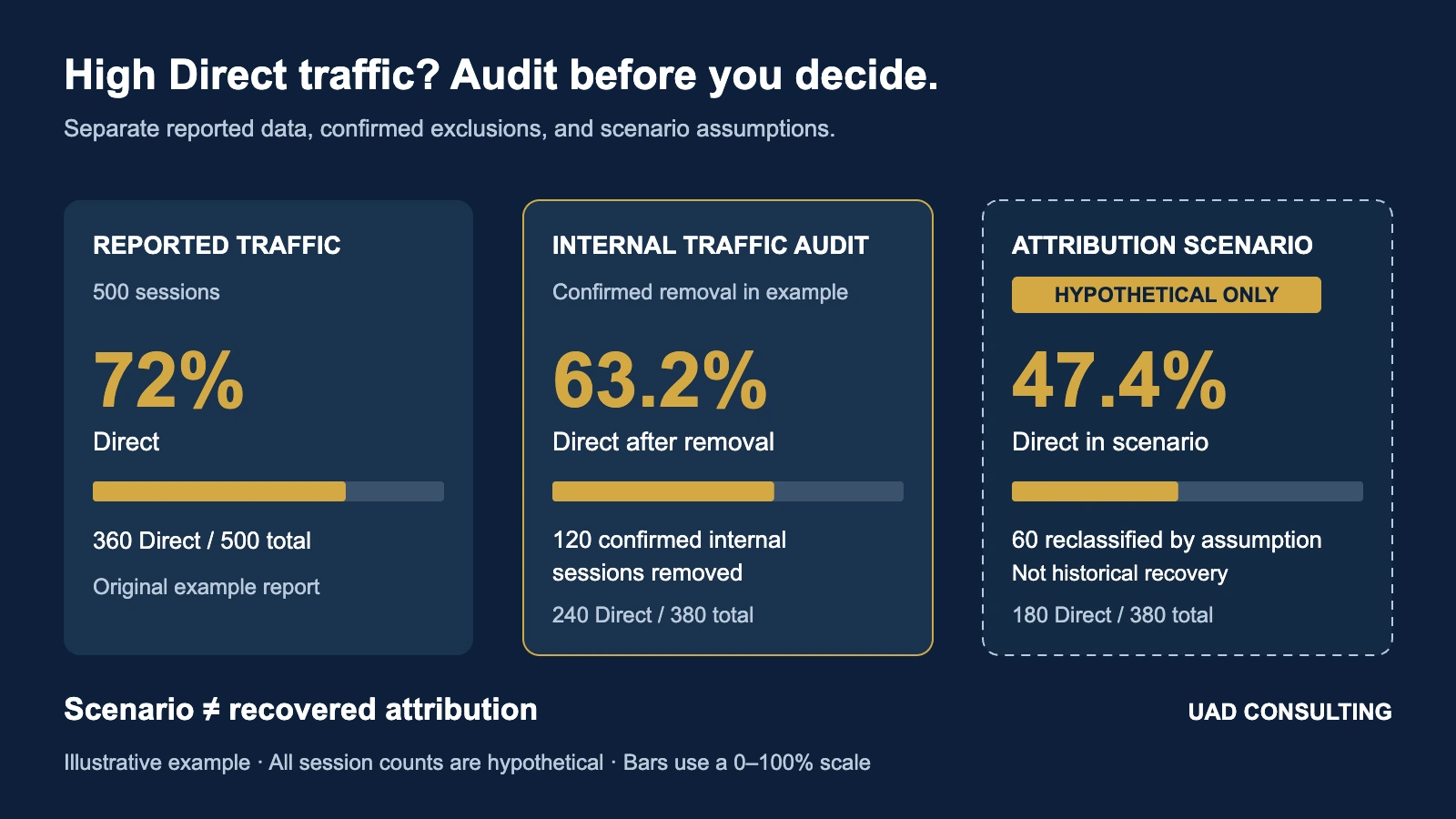
During a reporting period, GA4 records 500 sessions.
The acquisition report shows:
| Session Acquisition Category | Sessions | Share |
|---|---|---|
| Direct | 360 | 72.0% |
| Organic Search | 65 | 13.0% |
| Social | 40 | 8.0% |
| Referral | 20 | 4.0% |
| 15 | 3.0% | |
| Total | 500 | 100.0% |
These are illustrative grouped acquisition categories, not literal Session source / medium values. For example, Direct corresponds to (direct) / (none). "Social" is a combined reporting category in this example; GA4's default channel group distinguishes Organic Social and Paid Social.
All figures are hypothetical.
They are not drawn from UAD Consulting's private analytics or any client's website.
The purpose is to demonstrate how a measurement audit can change the interpretation of an acquisition report.
At first glance, 72% Direct traffic might suggest that most visitors already know the company's website address.
But that conclusion has not been established.
The company needs to investigate whether the measurement system is accurately representing external acquisition.
Stage 1: Identify Confirmed Internal Traffic
Suppose the company investigates its analytics implementation.
It identifies 120 sessions generated by its own team.
Assume all 120 sessions were originally classified as Direct.
This assumption is important.
Internal traffic can also arrive through tagged campaigns, search engines, or referral links.
In this particular hypothetical example, all confirmed internal sessions belong to the Direct category.
For this illustration, also assume these are all internal sessions in the cohort. In a real audit, unrecognized internal activity may remain, so the residual should not automatically be labeled verified external traffic.
Removing those sessions from an analytical copy of the reporting dataset changes the calculation.
Original sessions:
500
Confirmed internal sessions:
120
Remaining external sessions:
Original Direct sessions:
360
Confirmed internal Direct sessions:
120
Remaining Direct sessions:
Adjusted Direct share:
Rounded:
63.2%
The reported Direct share was originally 72%.
After excluding confirmed internal activity, the analytical share is 63.2%.
This is a reduction of approximately 8.8 percentage points.
The business did not necessarily lose website traffic.
The denominator changed because known internal sessions were separated from external activity.
Compare the results
| Metric | Original Report | After Confirmed Internal Removal |
|---|---|---|
| Total sessions | 500 | 380 |
| Direct sessions | 360 | 240 |
| Direct share | 72.0% | 63.2% |
| Confirmed internal sessions included | 120 | 0 |
This calculation demonstrates why the denominator matters.
But it does not establish that every remaining Direct session is correctly classified.
A second investigation is needed.
Stage 2: Investigate Missing Campaign Attribution
Suppose the business reviews its external marketing links.
The team discovers that some newsletter and social links were distributed without consistent campaign parameters.
It also identifies a redirect configuration that may have removed tracking parameters from certain landing-page requests.
The team now has a plausible explanation for some Direct sessions.
But plausibility is not proof.
To understand the potential measurement consequences, consider a separate scenario.
Assume 60 of the remaining 240 Direct sessions would have been attributed to Social if their source information had been captured correctly.
This is a hypothetical sensitivity assumption.
It is not a verified reconstruction of historical user journeys.
The revised scenario becomes:
Direct:
Social:
Total external sessions:
380
Scenario Direct share:
Rounded:
47.4%
Scenario Social share:
Rounded:
26.3%
Three different interpretations
| Measurement Stage | Direct Sessions | Total Sessions | Direct Share |
|---|---|---|---|
| Original GA4 report | 360 | 500 | 72.0% |
| Confirmed internal traffic removed | 240 | 380 | 63.2% |
| Additional hypothetical attribution scenario | 180 | 380 | 47.4% |
The first row describes the hypothetical original report.
The second row describes a defensible adjustment when the internal sessions have been independently identified.
The third row is a scenario about possible missing attribution.
It must not be presented as an observed correction.
Historical Direct sessions cannot automatically be assigned to Social simply because campaign tagging was incomplete.
The actual origins may remain unknown.
This distinction is essential for credible analytics.
Why the Difference Matters for Marketing Decisions
Imagine management interprets the original 72% Direct share as evidence of strong brand recognition.
The company decides that external marketing is less important than expected.
It reduces investment in content distribution.
But suppose a meaningful portion of the apparent Direct traffic actually originated from poorly tagged marketing activity.
The original report would then provide an incomplete view of acquisition.
The business could underestimate the importance of certain channels.
The opposite mistake is also possible.
Management might assume that every unexplained Direct visit came from social media.
That would overstate social media's contribution without supporting evidence.
Neither conclusion is justified by the Direct label alone.
A trustworthy analysis should separate:
What was observed.
What was verified.
What remains uncertain.
What is being modeled as a hypothetical scenario.
How to Audit Direct Traffic in GA4
A practical audit can be organized into five steps: acquisition scope, internal identification, filter testing, campaign tagging, and redirect validation. The first three are below; the tagging and redirect checks follow in their own sections.
Step 1: Use the correct acquisition dimension
Open:
Reports → Acquisition → Traffic acquisition
Depending on the property's report navigation, the report may appear under a business-objective collection.
Use:
Session source / medium
or:
Session default channel group.
These dimensions describe session-level acquisition.
Do not confuse them with:
First user source / medium.
First-user acquisition describes how a user was originally acquired within the available measurement context.
Session acquisition describes the acquisition information associated with sessions.
A returning visitor may have a different session source from their original acquisition source.
The two reports answer different questions.
Google documents these distinctions in its traffic-source guidance:
About traffic-source dimensions
Before comparing numbers, confirm that the reports use the same date range, metric, scope, and relevant filters.
Step 2: Verify internal traffic identification
GA4 provides a method for identifying internal website traffic using IP-address rules.
The configuration begins under:
Admin
Data collection and modification
Data streams
Select the web stream
Configure tag settings
Define internal traffic
A rule can identify specified public IP addresses or address ranges.
The default traffic-type value is:
internal
However, an important distinction must be understood.
Creating a data filter does not automatically establish which visitors are internal.
The property also needs a valid internal traffic definition or another correctly implemented method of setting the traffic type.
A filter may exist without matching any events.
Therefore, an analyst should verify both the identification rule and the data filter.
Step 3: Test the filter before activation
GA4 data filters support different operating states.
| Filter State | Behavior |
|---|---|
| Inactive | The filter is not evaluated |
| Testing | Matching data is labeled for verification |
| Active | Matching incoming data is excluded from processing |
For an internal traffic filter, Testing is generally the appropriate starting point.
Google provides a dimension called:
Test data filter name
This can be used in an Exploration to examine matching events.
A simple Free Form Exploration can use:
Rows:
Test data filter name
Event name
Values:
Event count
Filter:
Test data filter name
contains the configured filter name.
If the filter matches, the relevant events can appear under that name.
Google notes that a data filter can take 24–36 hours to apply.
Therefore, an immediate absence of matching events does not necessarily prove that the configuration failed.
Also, a row labeled:
(not set)
does not automatically prove that an IP address was entered incorrectly.
The date range, rule creation time, processing delay, and actual traffic matching must be considered.
If the internal traffic definition was created today, yesterday's events would not be retrospectively labeled.
Source:
Google Analytics Help. Filter out internal traffic.
Why activating the filter requires caution
An Active exclusion filter permanently affects incoming GA4 data.
Excluded events are not available in ordinary processed reporting or the corresponding BigQuery export.
This is not equivalent to temporarily hiding rows in a dashboard.
The change is not retroactive.
Previously collected internal activity does not automatically disappear from historical reports.
A business should therefore validate its rules before activating them.
Shared public IP addresses also deserve caution.
If legitimate customers use the same public network as employees, an overly broad rule could exclude real customer activity.
What If Employees Work Remotely?
IP-based identification has practical limitations.
Employees may use:
Home internet.
Mobile networks.
VPN connections.
Shared offices.
Changing public IP addresses.
A rule configured for one office network will not automatically identify all activity from remote employees.
A business may need additional methods for identifying test activity.
For example, an authenticated internal-user flag or a controlled testing configuration may be appropriate when implemented correctly.
Such approaches require careful configuration and privacy review.
They should not rely on exposing sensitive employee data to public website code.
The objective is to distinguish internal activity without accidentally excluding legitimate visitors.
Developer Traffic Is a Separate Problem
Internal traffic and developer traffic are related but distinct.
GA4 supports a Developer Traffic filter for activity generated while debug mode is enabled.
This can help prevent analytics testing from affecting ordinary reporting.
Google Tag Manager Preview and Google Tag Assistant can enable debugging for a selected testing session.
GA4 DebugView can then display relevant events as they are collected.
But enabling DebugView does not automatically mean that all developer activity has been excluded from standard reports.
The developer filter must be configured and validated appropriately.
Also, a referral source such as:
tagassistant.google.com
should not be interpreted as organic search traffic or AI-generated customer acquisition.
It is associated with Google's tag-testing environment.
The source alone does not establish that every such session was generated by the business owner.
The appropriate classification depends on the testing context.
Source:
Google Analytics Help. Filter out developer traffic.
How to Prevent Missing UTM Attribution
A practical campaign-tagging policy should specify how marketing links are constructed.
For example, a LinkedIn article promotion might use:
https://www.example.com/article?utm_source=linkedin&utm_medium=social&utm_campaign=analytics_education The source identifies LinkedIn.
The medium identifies the intended marketing channel.
The campaign identifies the specific initiative.
An email newsletter could use:
https://www.example.com/article?utm_source=newsletter&utm_medium=email&utm_campaign=analytics_education These examples use the same destination article but different acquisition sources.
The website can then analyze traffic by campaign and source.
Use a consistent naming convention
Consider these values:
linkedin.com
They may represent the same intended platform.
But inconsistent campaign tagging can fragment reporting.
A practical naming convention might use:
Lowercase values.
Consistent source names.
Consistent medium names.
Descriptive campaign identifiers.
A documented campaign taxonomy.
The specific taxonomy can vary by organization.
Consistency is more important than choosing a fashionable naming system.
Google recommends consistent campaign tagging and documents the relevant UTM parameters:
URL builders: Collect campaign data with custom URLs
Do not use campaign UTMs for ordinary internal navigation
UTM parameters are intended to identify external campaign acquisition.
Adding campaign UTMs to ordinary links between pages on the same website can distort campaign attribution and create confusing measurement behavior.
Internal navigation should generally use normal site links.
If the business needs to measure navigation behavior, GA4 events and event parameters are more appropriate.
For example, a business may track a consultation button with a descriptive event.
That provides information about the interaction without pretending that the internal click is a new external campaign.
Check Whether Redirects Preserve Campaign Parameters
Suppose a business publishes a clean article URL:
/analytics-guide Its physical website file might be:
/analytics-guide.html The public website may redirect the .html URL to the extensionless version.
That is a reasonable technical architecture.
But the redirect should preserve relevant query parameters where supported.
For example, an incoming tagged URL might contain:
/analytics-guide.html?utm_source=linkedin&utm_medium=social&utm_campaign=october After a correct redirect, the destination should retain the campaign parameters:
/analytics-guide?utm_source=linkedin&utm_medium=social&utm_campaign=october If the parameters disappear, the analytics system may lose information about the visit's origin.
A redirect audit should therefore check:
HTTP status.
Final destination.
Redirect chain length.
Query-string preservation.
Canonical URL consistency.
Analytics collection on the final landing page.
The canonical page identity can remain extensionless without including temporary campaign parameters.
Campaign tracking URLs and canonical URLs serve different purposes.
How to Validate Campaign Attribution End to End
A campaign link should be tested before distribution.
A practical workflow is:
- Construct the tagged URL.
- Open it in a controlled browser testing session.
- Inspect the redirect chain.
- Confirm the final landing page retains the intended parameters.
- Confirm the GA4 tag fires according to the site's consent and privacy configuration.
- Inspect relevant events using Tag Assistant or DebugView.
- Allow for reporting processing delays.
- Review the appropriate session acquisition dimensions.
A successful page view does not by itself prove that campaign attribution was processed as intended.
Likewise, an event appearing in DebugView does not guarantee that every downstream report will display identical attribution.
DebugView is primarily an implementation diagnostic.
The processed acquisition reports are more appropriate for evaluating finalized session-source information.
For related implementation context, see:
Web Analytics Measurement & Tracking Implementation
Can You Recover Historical Direct Traffic?
Sometimes analysts can identify historical implementation problems.
For example, an archived campaign spreadsheet may show that a particular newsletter was distributed without UTM parameters.
Server-side request records, campaign delivery information, or other appropriately collected evidence may provide additional context.
But reconstructing the exact origin of every historical Direct session is often impossible.
A business should not silently rewrite historical channel totals based on speculation.
A more defensible approach is to maintain separate views:
Original observed GA4 data.
Verified exclusions or corrections supported by evidence.
Scenario estimates based on explicit assumptions.
This makes the analysis reproducible.
It also prevents uncertain reconstructions from being presented as recorded facts.
A Direct Traffic Audit Should Not Stop at Sessions
A high Direct percentage is a measurement concern.
But management ultimately needs to understand business performance.
That requires looking beyond the acquisition label.
For each source, an organization may examine:
Sessions.
Engaged sessions.
Engagement rate.
Relevant landing pages.
Meaningful interaction events.
Qualified leads.
Consultation requests.
Completed purchases.
Customer acquisition cost.
Customer value.
Not every website needs every metric.
The correct selection depends on its business model.
For a consulting business, a completed inquiry may be more meaningful than a generic page view.
For an ecommerce company, validated purchases and contribution margin may be more relevant.
A traffic source that generates many sessions is not automatically the most commercially valuable source.
Why Event Counts and Session Counts Must Not Be Mixed
GA4 is an event-based measurement platform.
A single session may generate multiple events.
For example, one visitor may trigger:
session_start
page_view
scroll
user_engagement
consultation_click
These are not five sessions.
They are different events that may occur during one session.
Similarly, a report showing 100 page views does not necessarily represent 100 users.
A correct analysis must use compatible metrics and denominators.
This matters when evaluating filters.
An Exploration using:
Event count
may show the number of events matching a test filter.
That is not necessarily the number of sessions that would be excluded.
If management wants to estimate the effect on session acquisition, the analysis must use session-level metrics and a compatible methodology.
How Does Direct Traffic Relate to Marketing Attribution?
Traffic-source reporting describes how GA4 classifies observed acquisition.
Marketing attribution assigns conversion credit under a specified attribution framework.
These are related but different analytical questions.
A visitor may interact with multiple channels before becoming a customer.
GA4 may assign session-level acquisition differently from conversion attribution.
Neither automatically proves that a channel caused the conversion.
Suppose a customer reads a LinkedIn post, later searches for the company, and eventually returns directly to request a consultation.
The observed journey may contain several touchpoints.
Attribution determines how those observed interactions receive credit.
Causal incrementality asks whether the customer would have converted without a particular marketing intervention.
A correctly tagged LinkedIn session does not prove that LinkedIn caused the eventual consultation.
For a deeper discussion, see:
Marketing Attribution vs. Incrementality
The distinction is important when marketing budgets depend on reported performance.
Why GA4 and BigQuery May Still Disagree
Even after improving internal traffic filtering and campaign tagging, GA4 reports and BigQuery queries may not produce identical results.
Possible reasons include:
Different metric definitions.
Different processing stages.
Session reconstruction logic.
Identity and reporting differences.
Attribution processing.
Date and timezone handling.
Data freshness.
Query logic.
Privacy-related reporting behavior.
A Direct traffic audit does not resolve every analytical reconciliation issue.
It addresses one part of the measurement system.
For a related framework, see:
Why Don't GA4 and BigQuery Numbers Match?
The central lesson is that different analytical outputs must be compared using consistent definitions.
A Practical Direct Traffic Audit Checklist
A business can summarize the investigation using the following framework.
| Audit Area | Main Question | Evidence Required |
|---|---|---|
| Acquisition scope | Are we comparing sessions or users? | Report dimensions and metric definitions |
| Internal traffic | Are employee visits identified? | Validated traffic rules and test results |
| Developer activity | Are testing events separated? | Debug configuration and developer filter checks |
| Campaign tagging | Are external links consistently tagged? | UTM inventory and link tests |
| Redirect behavior | Do campaign parameters survive navigation? | Redirect and landing-page tests |
| Referral information | Are expected referrers available? | Browser and collection diagnostics |
| Conversion measurement | Are meaningful actions recorded correctly? | Event and key-event validation |
| Historical uncertainty | Which classifications remain unknown? | Documented assumptions and limitations |
The objective is not necessarily to eliminate Direct traffic.
Some Direct traffic is legitimate.
The objective is to reduce avoidable measurement ambiguity and understand what the remaining Direct category can and cannot tell the business.
What Should Management Do After the Audit?
The next step depends on the findings.
If confirmed internal traffic is distorting reporting, the organization should implement a validated internal traffic policy.
If campaign links lack consistent UTMs, the marketing team should adopt a documented tagging convention.
If redirects remove tracking parameters, the website routing should be corrected.
If developer activity contaminates reporting, testing and production measurement should be separated.
If Direct traffic remains high after these checks, management should not automatically assume failure.
The remaining traffic may include genuine direct navigation and sources that cannot be reconstructed reliably.
The appropriate conclusion may be that some acquisition uncertainty remains.
That is more useful than inventing a precise channel breakdown.
Better Marketing Decisions Begin With Trustworthy Measurement
A high Direct traffic percentage can look like a marketing insight.
But before interpreting it as brand strength, channel weakness, or customer behavior, a business should examine how the number was produced.
The hypothetical website began with:
500 sessions.
360 Direct sessions.
72% Direct traffic.
After removing 120 confirmed internal sessions, the analytical Direct share fell to 63.2%.
Under a separate hypothetical attribution scenario, it fell to 47.4%.
These different results illustrate the consequences of measurement assumptions.
They do not establish that every business has the same problems or that any particular channel deserves more credit.
A reliable analytics system should distinguish recorded observations, verified corrections, and uncertain scenarios.
That is the foundation for using website analytics to make defensible marketing decisions.
References and Further Reading
- Google Analytics Help. Understand (direct) / (none) traffic.
- Google Analytics Help. Filter out internal traffic.
- Google Analytics Help. Filter out developer traffic.
- Google Analytics Help. URL builders: Collect campaign data with custom URLs.
- Google Analytics Help. About traffic-source dimensions.
- Google Analytics Help. Monitor events in DebugView.
Need More Reliable GA4 and Marketing Analytics?
UAD Consulting helps organizations evaluate website measurement, GA4 and Google Tag Manager configurations, campaign attribution, conversion tracking, and digital performance reporting.
Projects can include measurement audits, event validation, campaign tracking reviews, analytics reconciliation, and decision-focused dashboards.
The goal is not simply to collect more data.
It is to make the available data more useful for understanding customer behavior and evaluating business performance.
Explore our Marketing & Digital Analytics services or schedule a consultation to discuss your measurement requirements.
Explore ServicesGet in Touch