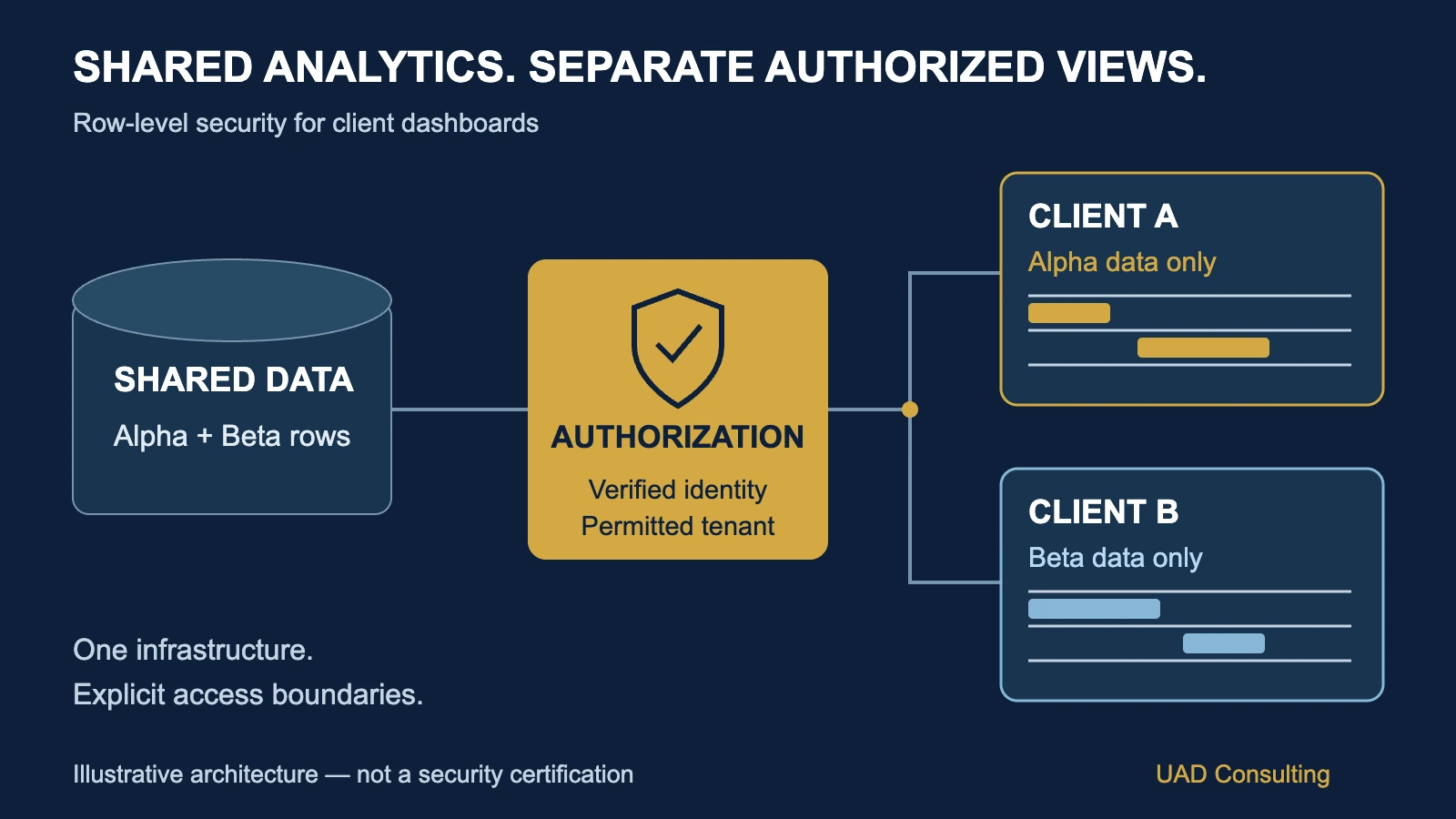
Imagine a digital marketing agency managing advertising campaigns for 40 different businesses.
Each client wants access to a dashboard showing campaign spending, conversions, customer acquisition costs, and marketing performance.
The agency has already built a centralized reporting system.
All campaign data flows into the same analytical database. A business intelligence tool uses that database to generate interactive dashboards.
From an engineering perspective, this architecture is efficient.
But it creates an important question:
How can the agency allow every client to use the same reporting system without allowing Client A to see Client B's information?
The answer is not simply to create 40 dashboard filters.
Filters can organize information, but they should not automatically be treated as security controls.
A reliable solution requires clearly defined identities, permissions, data boundaries, and access enforcement.
One important mechanism is row-level security.
The Short Answer: Use Security Rules, Not Just Dashboard Filters
Row-level security, commonly abbreviated RLS, restricts which database or analytical-model rows a particular user is authorized to access.
For example, suppose an analytical table contains transactions belonging to several customers.
A properly configured security policy can ensure that a user associated with Client A receives only Client A's authorized records.
The same underlying table may serve Client B, but Client B receives a different authorized view.
This allows organizations to reuse analytical infrastructure while enforcing client-specific data boundaries.
However, row-level security is only one part of a secure reporting architecture.
A complete solution must also consider:
- Authentication.
- Authorization.
- Database permissions.
- Semantic-model permissions.
- Data exports.
- Embedded reports.
- API access.
- Administrative privileges.
- Sensitive columns.
- Security testing.
A dashboard is not secure merely because its visible charts appear filtered.
The relevant question is whether every authorized access path consistently enforces the intended restrictions.
What Is Row-Level Security?
Row-level security is an access-control mechanism that determines which records a user may retrieve from a dataset.
Consider a simplified sales table.
| Order ID | Client | Revenue |
|---|---|---|
| A101 | Alpha | $1,200 |
| A102 | Alpha | $800 |
| B201 | Beta | $900 |
| B202 | Beta | $1,600 |
The complete dataset contains four orders.
Total revenue:
An internal administrator with appropriate permissions may need to analyze all four orders.
But a user representing Client Alpha should see only:
A101: $1,200
A102: $800
Total: $2,000
A user representing Client Beta should see only:
B201: $900
B202: $1,600
Total: $2,500
The same underlying analytical system can support both users.
The important difference is that the access-control mechanism determines which records are available to each identity.
What should happen to unauthorized users?
Suppose a third user has not been assigned to either client.
A fail-closed design should not automatically provide access to every record.
The system should deny access or return no authorized rows, depending on the permission model and application behavior.
Missing identity information must never be interpreted as permission to view the complete dataset.
Dashboard Filters Are Not Security Policies
This distinction is essential.
A normal dashboard filter answers:
"Which subset of the available data does the user want to examine?"
A security policy answers:
"Which subset of the data is the user authorized to access in the first place?"
These are different questions.
Imagine a dashboard with a dropdown containing two client names:
Alpha
Beta
If the underlying model makes both clients' records available to an unauthorized user, hiding Beta from the dropdown may not provide adequate protection.
Other access paths could still expose data if security is not enforced.
For example, a report might allow different drill-downs, exports, or connections to the analytical model.
The exact exposure depends on the platform, permissions, and configuration.
The design principle is straightforward:
User-interface filtering should not substitute for authorization.
A secure implementation should enforce access restrictions at the appropriate data or semantic-model layer.
A Worked Example: Securing Client Revenue in PostgreSQL
Consider a hypothetical analytics provider that stores client transactions in PostgreSQL.
The company wants two client-facing roles to query the same table.
Client Alpha should access only Alpha records.
Client Beta should access only Beta records.
For this demonstration, assume that the organization has already established a trusted authentication mechanism and can assign database roles securely.
The following SQL illustrates the core database-side mechanism.
It is a simplified educational example, not a complete production authentication or authorization system.
Step 1: Create the analytical table
CREATE SCHEMA IF NOT EXISTS reporting;

CREATE TABLE reporting.client_sales (
    tenant_id TEXT NOT NULL,
    order_id TEXT NOT NULL,
    net_revenue NUMERIC(12,2) NOT NULL,
    PRIMARY KEY (tenant_id, order_id)
);
The tenant_id field identifies the client that owns each record.
The composite primary key also allows different tenants to use the same local order identifier without treating those records as the same transaction.
Now insert illustrative data.
INSERT INTO reporting.client_sales
    (tenant_id, order_id, net_revenue)
VALUES
    ('alpha', 'A101', 1200.00),
    ('alpha', 'A102', 800.00),
    ('beta',  'B201', 900.00),
    ('beta',  'B202', 1600.00);
Without row restrictions, a suitably privileged query could calculate:
SELECT
    tenant_id,
    SUM(net_revenue) AS total_revenue
FROM reporting.client_sales
GROUP BY tenant_id;
Expected result:
| Tenant | Revenue |
|---|---|
| alpha | $2,000 |
| beta | $2,500 |
The query is mathematically correct.
But mathematical correctness does not establish that every user should be allowed to run it against the complete dataset.
Step 2: Define restricted database roles
For illustration, create three roles.
CREATE ROLE client_alpha NOLOGIN;
CREATE ROLE client_beta NOLOGIN;
CREATE ROLE client_unassigned NOLOGIN;
These are non-login roles.
A real application would need a trusted mechanism to associate authenticated users or sessions with the appropriate authorized role.
Do not let users choose their own database role based on an untrusted request parameter.
Grant the relevant roles access to the schema and table.
GRANT USAGE ON SCHEMA reporting
TO client_alpha, client_beta, client_unassigned;

GRANT SELECT ON reporting.client_sales
TO client_alpha, client_beta, client_unassigned;
These grants provide the necessary table-level privileges.
They do not yet establish client-specific row restrictions.
Step 3: Enable row-level security
ALTER TABLE reporting.client_sales
ENABLE ROW LEVEL SECURITY;
In PostgreSQL, enabling RLS causes applicable row-security policies to govern normal access.
If RLS is enabled and no applicable policy permits access, the default behavior is to deny access to rows.
However, important exceptions exist.
Superusers and roles with BYPASSRLS can bypass row security.
Table owners also normally bypass RLS unless forced to follow it.
For this example, require the table owner to follow applicable row-security policies as well.
ALTER TABLE reporting.client_sales
FORCE ROW LEVEL SECURITY;
This does not remove the special bypass capabilities of superusers or roles with BYPASSRLS.
Production access design must account for those privileged identities.
Step 4: Create client-specific policies
Define a policy for Client Alpha.
CREATE POLICY alpha_read
ON reporting.client_sales
FOR SELECT
TO client_alpha
USING (tenant_id = 'alpha');
Define a policy for Client Beta.
CREATE POLICY beta_read
ON reporting.client_sales
FOR SELECT
TO client_beta
USING (tenant_id = 'beta');
Under the intended isolated-role configuration:
Client Alpha can retrieve Alpha records.
Client Beta can retrieve Beta records.
The unassigned role has no matching policy.
Therefore, despite its SELECT grant, the unassigned role should retrieve no rows from this table.
These results assume that the effective roles do not also inherit broader permissions or other permissive policies.
PostgreSQL can combine multiple applicable permissive policies using OR logic.
Consequently, granting a user membership in multiple client roles can expand the records available to that user.
Role membership must be reviewed as carefully as the policy definitions.
Step 5: Validate the results
Execute tests using properly authorized, non-bypass identities.
For Client Alpha:
Expected visible rows: 2.
Expected total revenue: $2,000.
For Client Beta:
Expected visible rows: 2.
Expected total revenue: $2,500.
For the unassigned role:
Expected visible rows: 0.
The expected results are:
| Effective Role | Visible Rows | Visible Revenue |
|---|---|---|
| client_alpha | 2 | $2,000 |
| client_beta | 2 | $2,500 |
| client_unassigned | 0 | $0 |
For this display, an empty result set is shown as $0 revenue. In SQL, SUM() over no rows returns NULL unless it is explicitly converted, for example with COALESCE(SUM(net_revenue), 0).
These are expected results under the stated configuration.
They are not evidence that the SQL has been executed against a live database.
Actual implementation requires testing in the target environment.
Official reference:
PostgreSQL Documentation, Row Security Policies.
Why Tenant Identity Must Be Trusted
The SQL example used fixed database roles to make the policy easy to understand.
Real applications may serve hundreds or thousands of tenants.
Creating a separate policy for every customer may become difficult to maintain.
A more scalable design may use a trusted mapping between authenticated identities and authorized tenant identifiers.
Conceptually:
→ Verified Authorization Mapping
→ Permitted Tenant IDs
→ Authorized Rows
For example:
| User | Authorized Tenant |
|---|---|
| analyst.alpha@example.com | alpha |
| manager.alpha@example.com | alpha |
| analyst.beta@example.com | beta |
The system must verify the user's identity before applying the mapping.
It should not trust a client ID supplied through a URL, browser control, or unverified application request.
In some systems, a user may legitimately belong to multiple tenants.
That relationship should be represented explicitly.
Authorization should not depend on guessing which customer the user intended to access.
Identity changes also matter
A client employee may leave the organization.
A contractor may lose access.
A user may move between departments or accounts.
A company may terminate a customer relationship.
The security system must support timely permission changes and access revocation.
A policy that worked correctly when the dashboard launched may become inappropriate if user mappings are not maintained.
How Does Row-Level Security Work in Power BI?
Power BI supports row-level security in semantic models.
Roles can define filters that determine which rows are visible to users.
A simple static filter might restrict a model to one region or customer.
For example, a role filter on a client table might be:
[tenant_id] = "alpha"For larger systems, dynamic RLS can use the authenticated user's identity to determine which records are available.
Power BI supports functions such as USERPRINCIPALNAME() for identity-based filtering.
A conceptual dynamic security expression on an authorized-user mapping table might be:
[UserUPN] = USERPRINCIPALNAME()This expression is only one part of the implementation.
The semantic model must also have correctly configured relationships that propagate the security filter to the appropriate fact tables.
The identity mapping must be accurate.
The authenticated identity must match the expected identifier format.
The user must be assigned to the appropriate RLS role.
And the complete configuration must be tested.
A critical Power BI limitation
Microsoft documents that Power BI semantic-model RLS restricts users with the Viewer workspace role.
It does not restrict workspace Admins, Members, or Contributors in the same way.
This matters when sharing reports with clients.
A company should not grant elevated workspace permissions merely to make report access easier.
External users should receive only the permissions required for their intended reporting tasks.
Microsoft also documents additional considerations for external guest users and embedded scenarios.
Those configurations require testing with the actual user identity and access path.
Official reference:
Microsoft Learn, Row-level security with Power BI.
Database RLS and Power BI RLS Are Not Automatically the Same Thing
Suppose a PostgreSQL database already enforces row-level security.
The company imports data from PostgreSQL into a Power BI semantic model.
Does the original database policy automatically protect every user who opens the imported report?
No.
With imported data, the semantic model contains its own stored representation of the retrieved records.
The original source-database security rules are not automatically applied to every Power BI report viewer.
Appropriate semantic-model security must be configured.
DirectQuery configurations may involve source-side security, but the effective behavior depends on connection credentials, identity delegation, single sign-on, and the specific platform.
The safe approach is to verify the actual security boundary rather than assuming that permissions automatically propagate through every data layer.
A layered architecture
A practical architecture may look like this:
|
v
Identity and Authorization
|
v
BI Semantic Model
|
v
Database or Warehouse
|
v
Authorized Analytical Data
Each layer has a distinct responsibility.
Authentication determines who the user is.
Authorization determines what the user may access.
The BI model determines how information is represented and filtered.
The database stores and retrieves records.
The organization must understand where security is enforced and which access paths can bypass a particular layer.
The Hidden Risk: Incorrect Joins Across Tenants
Row-level security cannot compensate for every data-modeling mistake.
Consider a system where different customers can generate the same order identifier.
Client Alpha has order 1001.
Client Beta also has order 1001.
If an analytical transformation joins tables using only order_id, records belonging to different tenants may be incorrectly combined.
A safer relational design preserves the tenant key through the join.
For example:
SELECT
    o.tenant_id,
    o.order_id,
    o.net_revenue,
    c.customer_segment
FROM reporting.orders AS o
JOIN reporting.customers AS c
    ON o.tenant_id = c.tenant_id
   AND o.customer_id = c.customer_id;
The query assumes both tables contain trustworthy tenant identifiers.
It also assumes the customer relationship is correctly defined.
The key principle is that tenant identity should remain part of the analytical data model when records are not globally unique.
Otherwise, an upstream transformation may combine information incorrectly before the dashboard ever receives it.
This is both a data-quality and access-governance concern.
For a related discussion, see UAD Consulting's article:
Before You Trust the Dashboard: Data Quality Checks Every Analytics Pipeline Needs.
Row-Level Security Does Not Protect Every Type of Sensitive Information
RLS determines which rows a user can access.
It does not automatically determine which columns should be visible.
Suppose a client is authorized to view its own customer records.
Those records may contain:
Customer names.
Email addresses.
Phone numbers.
Financial information.
Sensitive operational details.
The user may be authorized to view aggregate sales but not individual customer contact information.
Row-level filtering alone does not resolve that distinction.
Depending on the platform, additional controls may include:
Column-level privileges.
Object-level security.
Data masking.
Restricted views.
Aggregation.
Separate semantic models.
Purpose-specific datasets.
These controls address different aspects of access.
A complete design should start with the information each audience actually needs.
Do not expose detailed data merely because the dashboard can technically display it.
A Practical Security Testing Matrix
Security testing should verify both permitted and prohibited access.
A report that displays the correct information for one user has not necessarily been adequately tested.
Consider the following illustrative test matrix.
| Test | Alpha User | Beta User | Unassigned User |
|---|---|---|---|
| View Alpha transactions | Allowed | Denied | Denied |
| View Beta transactions | Denied | Allowed | Denied |
| View own revenue total | Allowed | Allowed | Denied |
| View another client's total | Denied | Denied | Denied |
| Export unauthorized rows | Denied | Denied | Denied |
| Access unauthorized data through API | Denied | Denied | Denied |
These are desired authorization outcomes, not automatically guaranteed platform behaviors.
They must be verified in the actual environment.
Test more than the default report page
A meaningful test plan should examine relevant access paths, including:
Direct report access.
Drill-through pages.
Underlying data views.
Data exports.
Subscriptions.
Shared report links.
Semantic-model access.
Embedded applications.
APIs.
Administrative roles.
Cached or previously generated outputs.
Not every platform supports every feature.
The test scope should match the features actually enabled.
Test negative cases
Negative tests ask whether unauthorized actions are prevented.
For example:
Can a Beta user retrieve an Alpha record?
Can a user without tenant membership see any client data?
Can a report viewer access an underlying dataset through another permitted interface?
Can a previously authorized user still access information after permission revocation?
These questions are as important as confirming that the intended dashboard loads successfully.
Should Every Client Have a Separate Database?
Not necessarily.
There are several possible architectural approaches.
Shared database with shared tables
Multiple clients' records reside in the same tables.
A tenant identifier distinguishes ownership.
Appropriate security policies restrict access.
This can simplify centralized analytics, but requires disciplined authorization and data-model design.
Shared database with separate schemas
Different clients may have separate schemas or related logical structures.
This can provide additional organizational separation.
However, schema separation does not automatically eliminate permission or application-security risks.
Separate databases
Each client receives a separate database.
This can create stronger operational separation in some designs.
It can also increase provisioning, maintenance, migration, and reporting complexity.
Separate databases are not automatically secure merely because they are separate.
Credentials, access policies, backups, and administrative processes still matter.
Choosing the architecture
| Consideration | Shared Tables | Separate Schemas | Separate Databases |
|---|---|---|---|
| Centralized reporting | Often straightforward | Requires coordination | Requires integration |
| Tenant separation | Policy-based | Schema and permission design | Database-level separation |
| Operational overhead | Often lower | Moderate | Often higher |
| Client-specific customization | Can become complex | More flexibility | Greater independence |
| Security requirements | Strong policy discipline | Strong permission discipline | Strong infrastructure discipline |
These are general architectural tendencies, not universal rankings.
The best approach depends on tenant count, data sensitivity, regulatory requirements, performance needs, cost, and operational capabilities.
A small reporting provider may reasonably use shared analytical tables with carefully tested security policies.
An organization with strict isolation requirements may prefer stronger separation.
The decision should follow the actual risk and business context.
How Much Does Secure Multi-Client Reporting Cost?
Security architecture also has an economic dimension.
Suppose a reporting provider supports 40 clients.
One option is to maintain 40 separate dashboard models.
Another is to maintain a shared analytical model with appropriate client-level authorization.
A shared architecture may reduce duplicated model maintenance.
For example, assume a common metric-definition change requires 30 minutes per independent model.
Updating 40 models would require:
= 20 hours
If a shared model requires three hours for implementation, regression testing, and access validation, the illustrative difference would be:
At an assumed internal labor cost of $75 per hour:
This is an illustrative maintenance comparison.
It is not a benchmark for typical dashboard development costs.
It also excludes infrastructure costs, security engineering, licensing, monitoring, and incident response.
A shared architecture may reduce repetitive work, but only if the access-control system is properly designed and maintained.
The objective should not be minimizing dashboard maintenance at the expense of data confidentiality.
A Five-Step Framework for Secure Client Analytics
Organizations evaluating multi-client reporting can begin with five questions.
1. Who needs access?
Identify users, organizations, departments, and external partners.
Document their authorized scope.
Avoid granting access based only on convenience.
2. Which data belongs to whom?
Define the tenant or organizational key.
Determine whether some data is shared across tenants.
Document exceptions.
Review joins, aggregations, and source-system ownership rules.
3. Where will access be enforced?
Determine whether restrictions belong in the database, warehouse, semantic model, application, or multiple layers.
Understand how data moves between them.
Do not assume source permissions automatically follow imported datasets.
4. How will access be tested?
Create positive and negative tests.
Test real user roles.
Verify aggregate and detailed views.
Review exports and alternative access paths.
Test permission changes and revocation.
5. Who owns ongoing governance?
Assign responsibility for maintaining authorization mappings.
Define how new clients are onboarded.
Define how departing users lose access.
Review privileged roles.
Retest when models, permissions, or reporting infrastructure change.
Security is not a one-time dashboard configuration.
It is an ongoing operational responsibility.
Data Security and Analytical Accuracy Are Different Requirements
A secure dashboard can still display incorrect metrics.
An accurate dashboard can still expose information to unauthorized users.
These are independent dimensions of quality.
For example, row-level security may correctly restrict a client to its own sales records.
But a faulty join could duplicate those sales before aggregation.
The client would see only its own data, yet the reported revenue could still be wrong.
Conversely, a perfectly calculated revenue total may still be inappropriate to disclose to another client.
A trustworthy analytical system therefore requires both:
Accurate information.
Appropriate access.
For related discussion of analytical consistency, see UAD Consulting's article:
Why Dashboard Numbers Don't Match.
The Goal Is One Trusted Reporting System, Not Just One Dashboard
Organizations often centralize analytics to reduce duplicated reporting work.
That can be a reasonable objective.
But centralization also concentrates responsibility.
A shared reporting system must clearly define which users can access which information.
Row-level security is one useful tool for enforcing those boundaries.
Its effectiveness depends on identity, permissions, data modeling, platform behavior, and validation.
A successful multi-client analytics architecture should allow authorized users to obtain consistent business information without exposing records belonging to other customers.
The important question is therefore not simply:
"Can we build one dashboard for everyone?"
It is:
"Can we build a maintainable reporting system that provides the correct information to each authorized audience?"
That is a more useful starting point for both data engineering and business intelligence.
References and Further Reading
- PostgreSQL Global Development Group. PostgreSQL Documentation: Row Security Policies.
- Microsoft Learn. Row-level security (RLS) with Power BI.
- Microsoft Learn. Roles in Workspaces in Power BI.
Need to Design a More Reliable Analytics Architecture?
UAD Consulting helps organizations organize analytical data, develop SQL workflows, improve reporting structures, and design business intelligence solutions around practical business needs.
Projects can include reviewing data models, clarifying reporting requirements, evaluating access-control designs, and improving the consistency of analytical outputs.
Explore our Data Engineering & Database Analytics services.
For dashboards and decision-focused reporting, explore our BI & Data Visualization services.
Contact UAD Consulting to discuss your reporting architecture and analytical requirements.
Explore ServicesGet in Touch